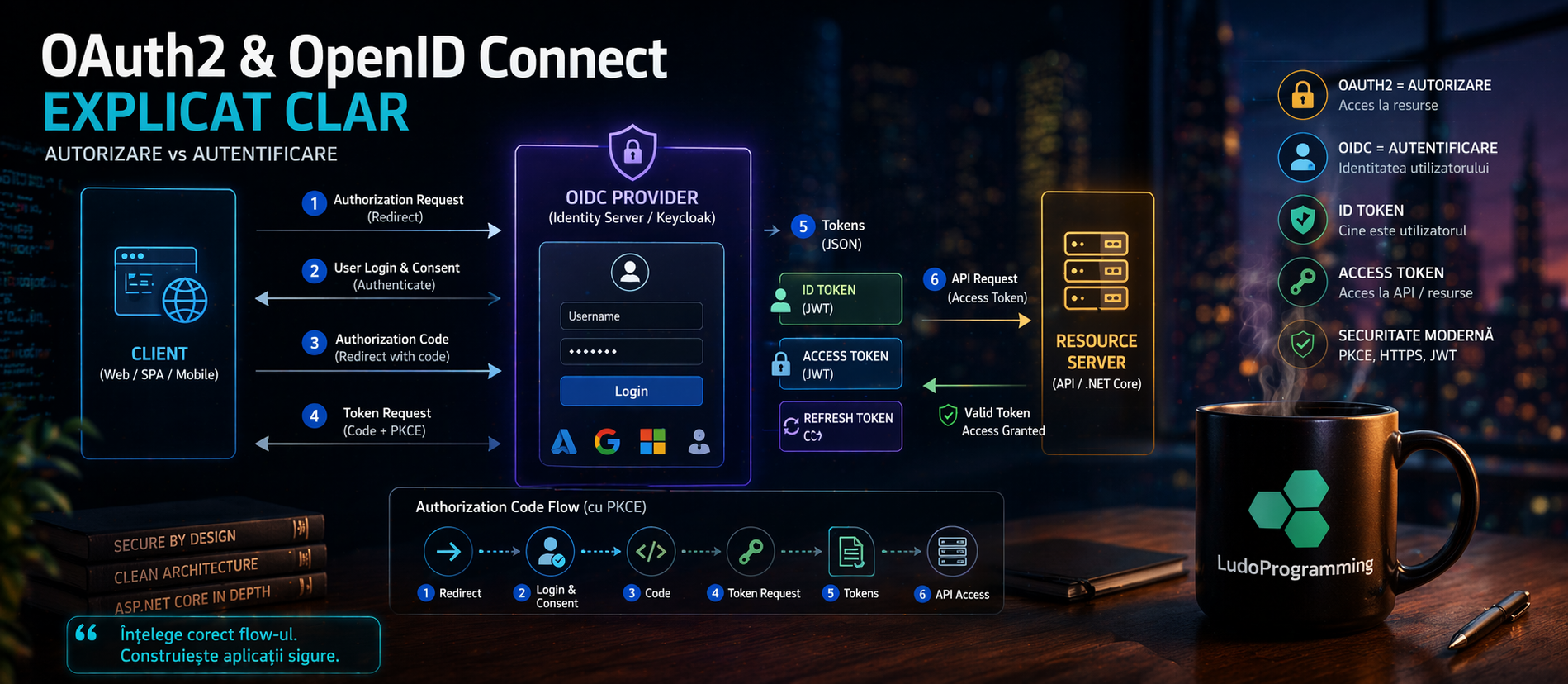
How Modern Authentication Works in .NET Applications
Series: Security by Design in .NET: From JWT to Certificate-based Authentication
If you have used:
-
Login with Google
-
Login with Microsoft
-
Identity Server
-
Keycloak
👉 then you have used OAuth2 or OpenID Connect (probably without knowing exactly how it works).
🧠 The main problem
Many believe:
OAuth2 = authentication
❌ FALSE
🔑 What is OAuth2
OAuth2 is:
🔐 an authorization protocol
It allows an application to access resources on behalf of a user.
Simple example
“Login with Google”
Actually:
👉 your application requests access to:
-
email
-
profile
Google says:
“OK, but only if the user consents.”
Result
You receive:
{
"access_token": "abc123"
}
This token is used for:
✔ API access
❌ NOT to know who the user is (correct)
🧠 What is OpenID Connect (OIDC)
OpenID Connect is:
🔑 a layer on top of OAuth2 for authentication
It adds the concept of:
{
"id_token": "jwt_here"
}
ID Token
It is a JWT that contains:
{
"sub": "user123",
"email": "user@email.com",
"name": "John Doe"
}
👉 this tells you who the user is
⚔️ OAuth2 vs OpenID Connect
|
Feature |
OAuth2 |
OpenID Connect |
|---|---|---|
|
Purpose |
Authorization |
Authentication |
|
Token |
Access Token |
ID Token + Access Token |
|
User info |
❌ Not guaranteed |
✔ Yes |
|
JWT |
Not mandatory |
Yes (ID Token) |
🔁 Main flow: Authorization Code Flow
Steps:
1️⃣ User is redirected to the provider
2️⃣ Authenticates
3️⃣ Receives an authorization code
4️⃣ The application exchanges it for:
-
access token
-
id token (OIDC)
🔐 PKCE (important in 2026)
PKCE protects against code interception. Used in:
✔ SPA
✔ mobile apps
✔ Blazor WebAssembly
🧱 How it integrates in .NET
ASP.NET Core natively supports OIDC.
Example:
builder.Services.AddAuthentication(options =>
{
options.DefaultScheme = "Cookies";
options.DefaultChallengeScheme = "oidc";
})
.AddCookie("Cookies")
.AddOpenIdConnect("oidc", options =>
{
options.Authority = "https://your-identity-server";
options.ClientId = "client-id";
options.ClientSecret = "secret";
options.ResponseType = "code";
options.SaveTokens = true;
});
🔗 Common providers
You can integrate with:
-
Google
-
Microsoft
🧠 When you need OAuth2 / OIDC
✔ enterprise applications
✔ login with Google / Microsoft
✔ microservices
✔ SSO (Single Sign-On)
❌ When you DO NOT need it
If you have:
-
small application
-
simple login
-
no external providers
👉 you can just use Identity + JWT
🚨 Common mistakes
❌ using OAuth2 for authentication without OIDC
❌ not validating ID Token
❌ insecure token storage
❌ missing PKCE
❌ using implicit flow (deprecated)
🧱 Modern architecture
Client (Blazor / SPA)
↓
OIDC Provider (Keycloak / IdentityServer)
↓
Access Token (API)
↓
Resource Server (ASP.NET Core API)
🔥 Best Practices
✔ Use Authorization Code Flow
✔ Enable PKCE
✔ Validate ID Token
✔ Do not expose access token in frontend
✔ Use HTTPS mandatory
✔ Configure scopes correctly
🎯 Conclusion
👉 OAuth2 = authorization
👉 OpenID Connect = authentication
Together they form:
🔐 the modern authentication standard in enterprise applications