If you read the first article about AceEngine and wondered ok, but how does it actually work behind the scenes? — this is the article for you.
We will dissect the entire pipeline, from the moment your user writes a question in the widget, to the answer that appears on the screen. No buzzwords, no marketing — just how the system works.
Step 0: Automatic Indexing
Before AceEngine can answer anything, it needs to know what your site is about. This part is handled by automatic indexing, which runs in the background immediately after the widget loads.
The ace.js script extracts the main content of the current page — avoiding navigation, footer, and sidebars — and sends it to /api/index. From there, AceEngine splits the text into chunks, calculates embeddings using text-embedding-3-small, and stores them in Cosmos DB, associated with your license.
An important detail: indexing uses MD5 content hashing. If the page hasn't changed since the last indexing, nothing is recalculated — no embedding tokens are wasted. The system is idempotent by design.
Step 1: Semantic Cache
When a user sends a question, the first thing AceEngine does not do is go to GPT. The first step is to check the semantic cache.
The embedding of the question is calculated and the cache is searched for a semantically similar prompt — not textually identical. "How much does the Pro plan cost?" and "What is the price for Pro?" could return the same cached answer.
If the cosine similarity exceeds the configured threshold (default 0.85 for cache, versus 0.70 for RAG), the answer comes directly from the cache. Latency: under 10ms. Tokens consumed: zero.
If there is no hit in the cache, the process moves to the next step.
Step 2: RAG — Retrieval Augmented Generation
This is where AceEngine becomes truly useful for your specific site.
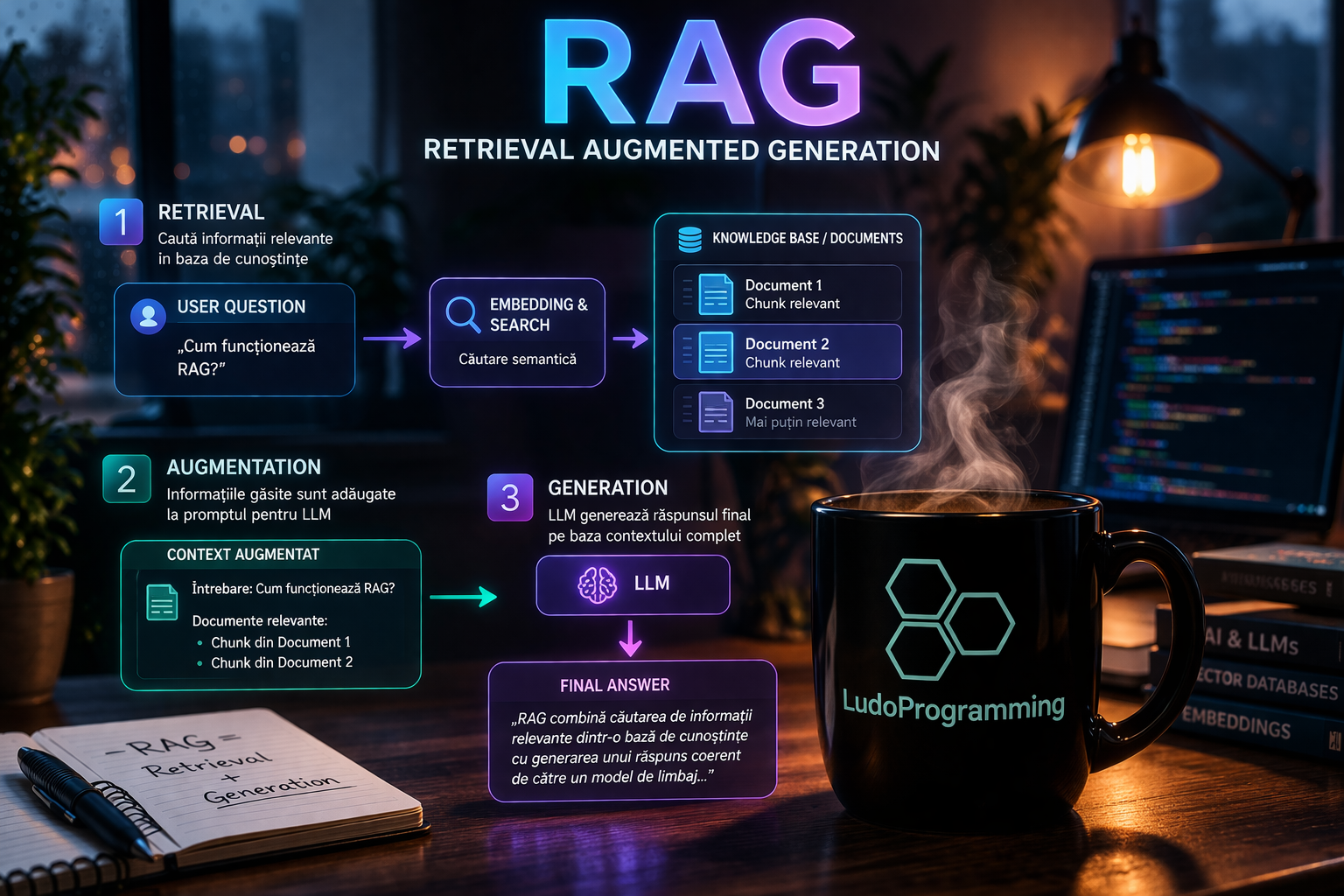
RAG means that instead of sending the question directly to the LLM and hoping it "knows" something about your product, you first build a context from the indexed data. The process looks like this:
- The embedding of the user's question is calculated
- A search is performed in the indexed vectors of your license (cosine similarity, threshold 0.70)
- The top 5 relevant chunks are taken
- These become the context sent to the LLM along with the question
The result: the LLM answers based on the real content of your site, not on general training knowledge. If your pricing page says the Pro plan costs 29 EUR/month, the widget will answer that.
Step 3: Topic Guard
This is a mechanism that solves a real and frequent problem.
Without topic guard, a user can ask the widget on your software site "Write me a poem about autumn" or "What is the capital of France?" and the LLM will happily respond, consuming your tokens for irrelevant queries.
With topic guard, if RagService.BuildContextAsync finds no relevant chunk in the indexed vectors (rag.HasContext == false), AceEngine does not call the LLM at all. It returns an off-topic type message directly, without consuming completion tokens.
Basically: if there is no relevant context in your knowledge base for that question, the system recognizes the question is not about your domain and responds accordingly. Simple, efficient, cheap.
Step 4: The Answer and Saving in Cache
If all checks pass and the LLM generates an answer, it is automatically saved in the semantic cache — ready for similar future questions. The first question is expensive (LLM call), the second is free (cache hit).
Why does this architecture matter?
Each step in the pipeline has a clear economic purpose:
- Hash-based indexing — you don't pay for re-embedding unchanged content
- Semantic cache — you don't pay twice for the same question
- Topic guard — you don't pay at all for irrelevant questions
- RAG with top-5 chunks — you send minimal context, not the entire database
The result: an AI widget that costs much less per request compared to a naive direct GPT integration, and that answers specifically about your site — not generically about the world.
What’s next
The pipeline described above represents the current stable version of AceEngine. We are working on integrating an agent layer that will allow the widget to execute more complex actions — not just answer, but orchestrate multiple reasoning steps before formulating a response.
If you want to test AceEngine on your site, you can start with the Basic plan — free, 500 requests/month, no card required.